Motivation
As a DevOps engineer, your personal website is your portfolio. It should demonstrate not just what you know but what you build. This blog is itself an example of a production-grade cloud architecture - every decision documented, every tradeoff explained.
Architecture Overview
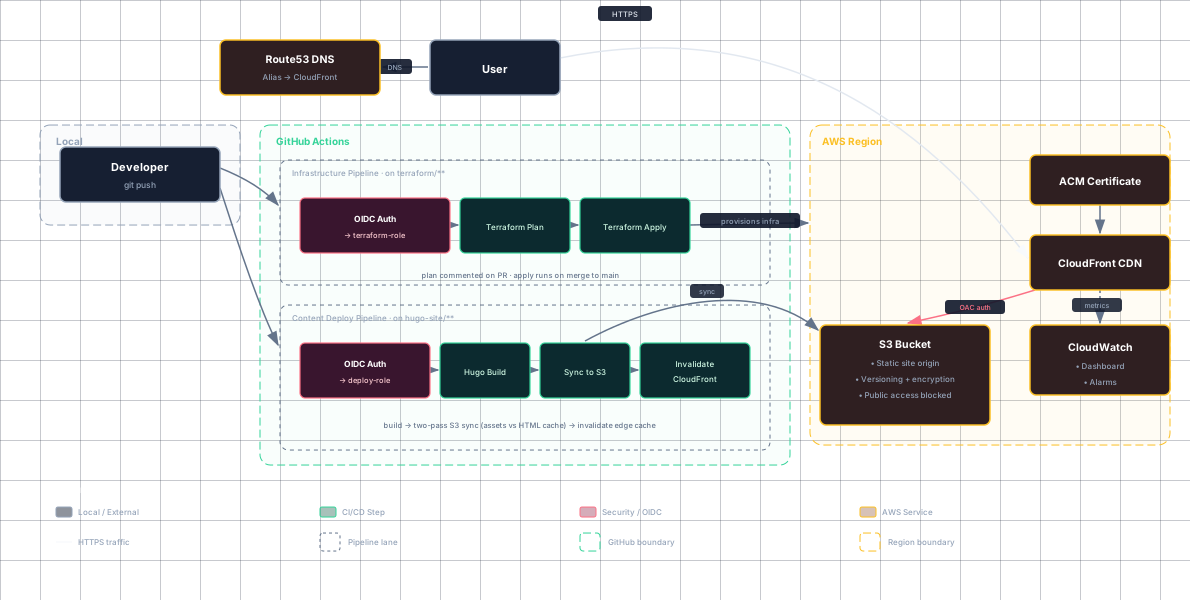
The stack:
| Layer | Technology |
|---|---|
| Content | Markdown → Hugo static site |
| CI/CD (Infra) | GitHub Actions - PR plan, merge apply |
| CI/CD (Content) | GitHub Actions - build, sync, invalidate |
| State Mgmt | S3 backend, concurrency-gated at pipeline level |
| Origin | S3 (private, versioned, encrypted, CloudFront OAC only) |
| CDN | CloudFront with HTTPS, Brotli/Gzip, security headers |
| DNS | Route 53 alias records (A / AAAA, root + www) |
| TLS | ACM certificate (auto-renewal, TLSv1.2_2021) |
| Auth | OIDC - no AWS access keys stored anywhere |
| Monitoring | CloudWatch dashboard + error rate alarm |
| Cost Control | AWS Budgets alert (direct email) |
Key Design Decisions
1. Two Separate Pipelines
Infrastructure changes and content changes have different risk profiles and review requirements. They’re handled by separate workflows:
infra.yml- Runsterraform planon every PR and posts the output as a comment. On merge tomain, runsterraform apply. Changes go through code review.deploy-content.yml- On every push tomainthat toucheshugo-site/, builds the site and syncs to S3. Fast, automatic, no review needed for a blog post.
2. Pipeline-Only Terraform Apply
terraform apply never runs from a local machine. The CI/CD concurrency gate (concurrency: group: terraform-apply) serializes applies, replacing DynamoDB state locking. This avoids unnecessary infrastructure complexity while maintaining safety.
The only manual step is creating the S3 state bucket (bootstrap.sh) - a chicken-and-egg problem Terraform can’t solve for itself.
3. S3 + CloudFront Origin Access Control (OAC)
No public S3 bucket. CloudFront authenticates via OAC, using sigv4 signing for every request. The bucket policy only allows cloudfront.amazonaws.com to read objects. No *Principal s3:GetObject - the bucket is fully private.
4. Two-Workflow CI/CD
- Infra pipeline (broad
{domain}-terraformIAM role): Terraform manages all AWS resources (S3, CloudFront, ACM, Route53, IAM, monitoring). - Content pipeline (narrow
{domain}-deployIAM role): S3 object CRUD +cloudfront:CreateInvalidationonly. Least-privilege: if the content pipeline is compromised, an attacker can only update blog files.
5. OIDC-Based CI/CD
No long-lived AWS keys. GitHub Actions assumes an IAM role via OpenID Connect, scoped to the specific repository. No secrets to rotate, no keys to leak.
6. Why No WAF?
This project intentionally omits a WAF web ACL. For a static site behind CloudFront:
- OWASP managed rules protect nothing - SQLi needs a database, command injection needs a shell, stored XSS needs a backend rendering user input. Against a bucket of HTML, these are security theater.
- AWS Shield Standard is automatic and free on CloudFront, absorbing L3/L4 volumetric attacks at the edge.
- The origin is unreachable directly - the bucket policy allows only the CloudFront distribution (OAC).
- WAF rate rules are per-IP - a distributed botnet stays under each IP’s threshold, so WAF doesn’t fully solve the denial-of-wallet problem either.
The cost comparison made the decision clear:
| Approach | Fixed cost | What it stops |
|---|---|---|
| WAF | ~$11/mo always | Single-IP floods only; OWASP rules stop nothing |
| Budget alert (AWS Budgets) | Free | Nothing - but bounds loss to ~1 day of flood spend |
AWS Budgets alerts email you directly when actual costs exceed a threshold. They provide the same practical protection against bill shock at zero ongoing cost.
7. No DynamoDB - Why Not?
Standard practice is S3 + DynamoDB for state locking, but for this project the CI/CD pipeline is the only thing that runs apply. A concurrency gate (cancel-in-progress: false) serializes applies without adding a second infrastructure dependency. If the system ever grows to multiple pipelines or local applies, DynamoDB is a one-command addition.
8. Static Website Without Public Bucket
Traditional static hosting requires s3:GetObject for *Principal. Not here. The bucket is fully private and only CloudFront (via OAC) can reach it.
Cost Breakdown
This entire setup costs ~$0.50/month for low traffic:
| Service | Cost |
|---|---|
| S3 storage | ~$0.03/month |
| CloudFront | ~$0.10/month (free tier covers most) |
| Route 53 | $0.50/month per hosted zone |
| ACM | Free |
| Budgets (first 2) | Free |
| Total | ~$0.63/month |
Pipeline Walkthrough
One-Time Bootstrap
There’s one chicken-and-egg problem: the pipeline needs the CloudFront
distribution ID and IAM role ARN to run, but those values only exist after
Terraform creates them. The solution is a single manual terraform apply:
| |
Note on ACM certificate validation: The certificate is created in
PENDING_VALIDATIONstate initially. Terraform creates DNS validation records in Route 53, but your domain must resolve to Route 53 first. Once you update your registrar’s nameservers to Route 53, the certificate validates automatically. CloudFront can reference the pending certificate, but HTTPS won’t work until validation completes.
Infrastructure change (e.g., adding a cache policy)
| |
- Open a PR → GitHub Actions runs
terraform planand posts the output as a PR comment - Review the plan in the comment - see exactly what will change
- Merge to
main→ GitHub Actions runsterraform applyautomatically
Content change (e.g., writing a blog post)
| |
- Push to
main→ GitHub Actions builds the Hugo site - Syncs to S3 - HTML gets shorter cache (10 min), assets get longer (1 hour)
- Invalidates CloudFront - clears the edge cache so readers see fresh content
- Smoke test - curls the domain to verify it’s serving
Conclusion
This blog demonstrates a real-world, cost-effective architecture that any DevOps engineer would be proud to maintain. The codebase is designed to be read, reviewed, and modified through the same GitOps practices used at companies operating at scale.